1. Templates
  2. Real Estate
  3. Estate Agents
  4. Seller Property Information Form

Seller Property Information Form

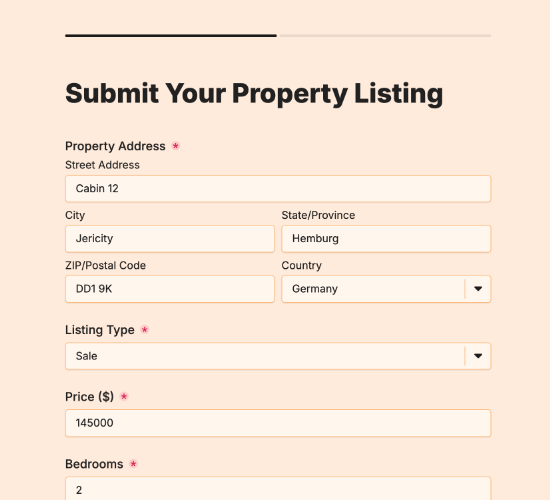
Collect a seller’s property details before listing — specs, photos, features and condition — to prep an accurate listing.

Description

A seller property information form gathers everything you need from a seller to prepare an accurate listing. Rather than pulling details out piece by piece, you get the property’s specs, photos and standout features in one submission, ready to build a listing that reflects the home properly and prices it right.

It captures the property address and photos, the year built and property type, the number of bedrooms and bathrooms, and any additional features or notes. Seller contact details and a confirmation field mean you know who you’re working with and that the information is theirs to share.

Customize the fields to match your listing prep, restyle it in your brand colors, and embed it on your site so seller details arrive ready to list.

Form fields

Everything the Seller Property Information Form above collects — 12 fields, so you can see exactly what it captures before you make it your own.

Seller Property Details

  • Property Address

    Short Answer Icon
    Short Answer
  • Upload Property Photos

    Short Answer Icon
    Short Answer
  • Year Built

    Short Answer Icon
    Short Answer
  • Property Type

    Short Answer Icon
    Short Answer
  • Please specify property type:

    Short Answer Icon
    Short Answer
  • Number of Bedrooms

    Short Answer Icon
    Short Answer
  • Number of Bathrooms

    Short Answer Icon
    Short Answer
  • Additional Features or Notes

    Long Answer Icon
    Long Answer
  • Seller's Name

    Name Icon
    Name
  • Contact Email

    Email Icon
    Email
  • Contact Phone Number

    Telephone Icon
    Telephone
  • Confirmation

    Multi-Select Icon
    Multi-Select
Use Template Arrow Right Icon

Template FAQs

Common questions about the Seller Property Information Form — what it captures, when to use it, and how to make it your own.

What is a seller property information form?

It’s a form agents use to collect a seller’s property details before listing. It captures specs, photos, features and condition, so you can prepare an accurate listing and price the home well, without dragging every detail out of the seller over multiple calls.

What details does it collect?

The property address and photos, the year built and property type, the number of bedrooms and bathrooms, and any additional features or notes. Seller contact details and a confirmation field complete it, so you know who you’re working with and can follow up.

When should a seller complete it?

Early in the listing process, before you prepare the marketing. Getting the specs, photos and features up front means you can build the listing, run comps and advise on pricing from accurate information, rather than guessing or waiting on details to trickle in.

Who is this form for?

Listing agents and brokerages preparing to market a property, and the sellers providing the details. It suits any agent who wants a seller’s property information captured thoroughly and consistently up front, so the listing goes together quickly and accurately.

Why ask for the year built and property type?

The age and type of a property shape how it’s marketed, priced and compared to others on the market. Capturing them up front lets you pull accurate comps, anticipate buyer questions, and position the home correctly from the first draft of the listing.

Is this form free to use?

Yes, it’s free. Create a Fun Forms account, customize the fields to match your listing prep, restyle it to your brand colors, and embed it on your website with no coding. Seller details then arrive in one place, ready to build a listing from.